GSoC 2026: PipeWire support


 gsoc,
gsoc-2026,
development,
PipeWire
gsoc,
gsoc-2026,
development,
PipeWire
Hi, I'm Priyanshu, and for my GSoC 2026 project, Daniel Schürmann and I have been working on adding PipeWire support to Mixxx on Linux.
What is PipeWire?
Linux audio stack has moved through a plethora of audio APIs depending on the use cases, beginning with ALSA (at the bottom of Linux audio stack), PulseAudio (a desktop audio centric API), JACK (a pro-audio oriented API with additional quality of life features like patchbay routing), and finally PipeWire, which addresses desktop as well as pro-audio use cases. It has compatibility with existing PulseAudio and JACK applications, and that's how Mixxx can run on PipeWire systems through its ALSA or JACK APIs.
One big advantage of PipeWire is that it puts all programs consuming and producing audio at the same abstraction level as hardware soundcards (similar to JACK). As a result, it is possible to route the output of an app to Mixxx, then connect Mixxx's output to some other DSP program (like easyeffects), and then output to any other program (even record the output to file using pw-record program). The possibilities are endless. One improvement over the JACK workflow is that you can use a PipeWire patchbay to manage Mixxx's routing entirely, bypassing Mixxx's own routing UI.
Currently Mixxx supports its audio APIs through PortAudio, allowing a common implementation to work with different native audio APIs. PortAudio exposes the lowest common API between all different platforms, limiting Mixxx to the same common subset and missing out on platform specific API and the features that would come with it.
As PipeWire gains more popularity on Linux, and more and more distributions having it as the default, Mixxx is lagging behind in the rich feature set provided by the API. With this project, Mixxx can now participate directly in the modern Linux audio stack without any compatibility layers or limitations.
Features
Hotplug
Have PipeWire events notify Mixxx on soundcard connect/disconnect so Mixxx handles DJ decks and audio interfaces connect/disconnect at runtime. This also works for programs open/close, and program ports addition/removal.
Integration with external patchbay
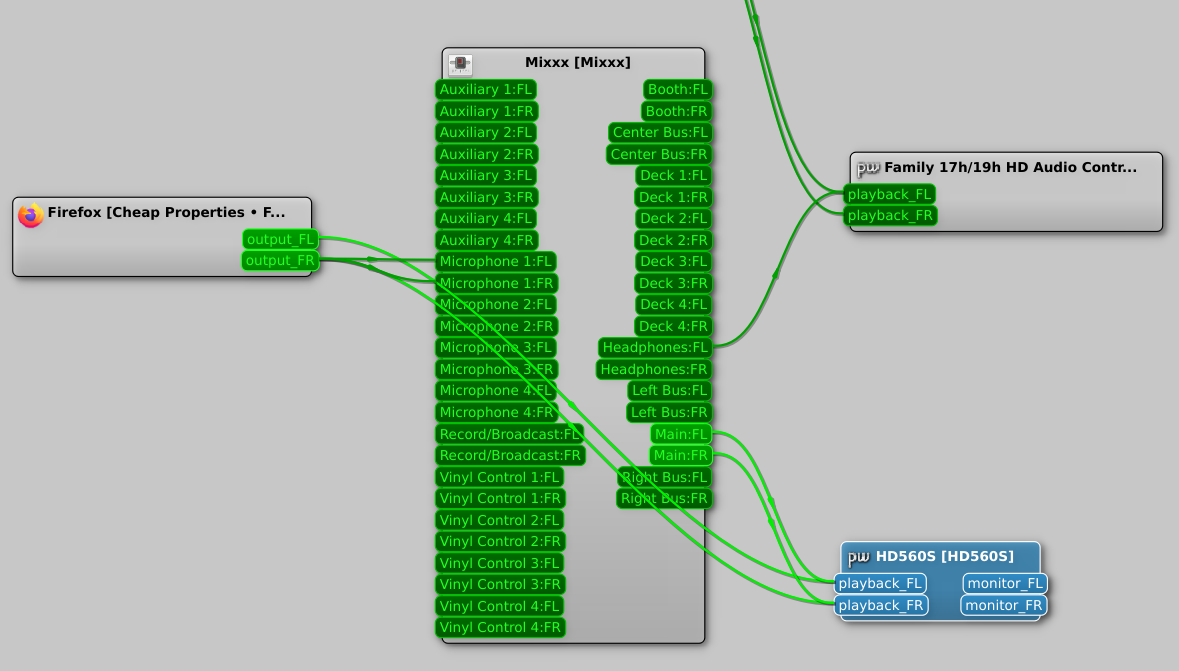
Mixxx supports routing with external patchbays like qpwgraph. For that you need to check the "Sync with external patchbay" checkbox in Sound API preference page. This disables Mixxx preference page and configuration loading, so you can use the patchbay for connecting/disconnecting, and let patchbay automatically route Mixxx on startups. The automatic routing also handles programs start and end at runtime. With this you also have the ability to connect multiple inputs and outputs to and from Mixxx. With the sync option off, Mixxx behaves in a more traditional way, where Mixxx UI routes take precedence over patchbay routes, and they are removed once configuration is applied.
For internal Mixxx configuration:
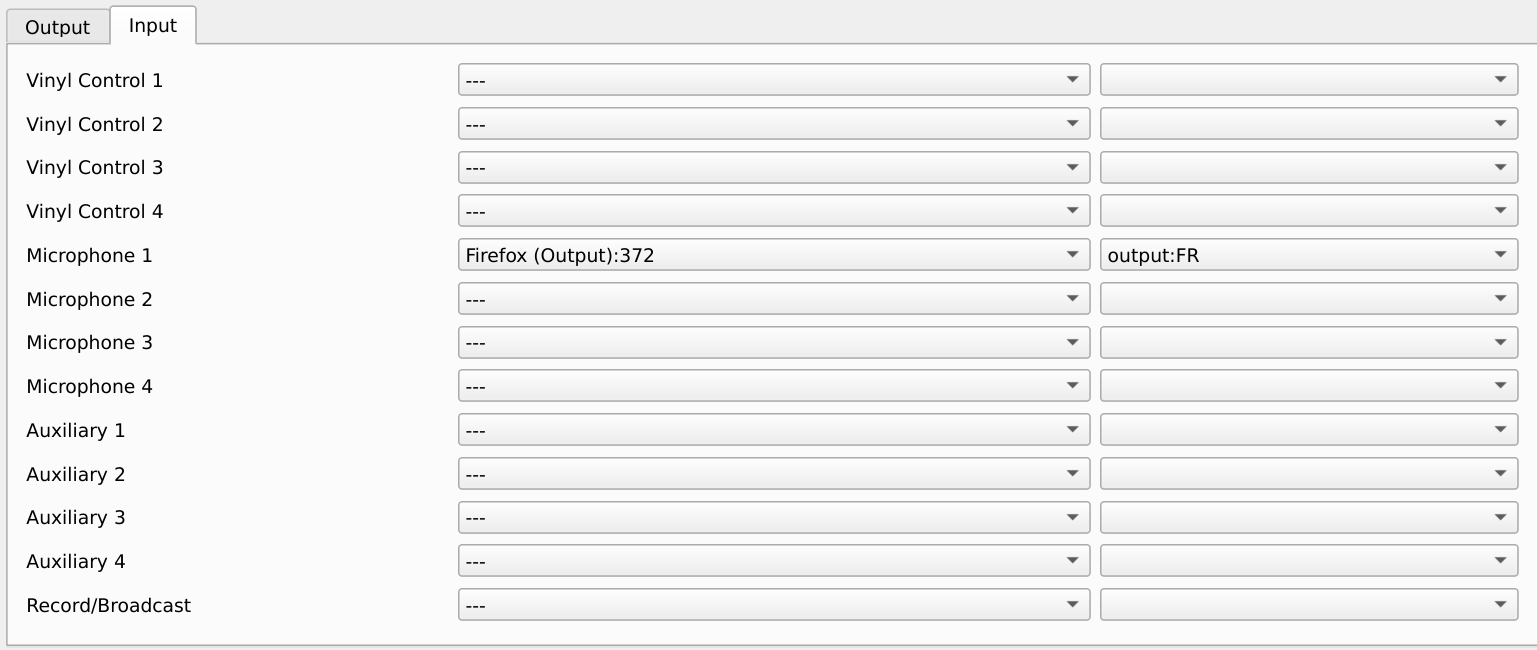
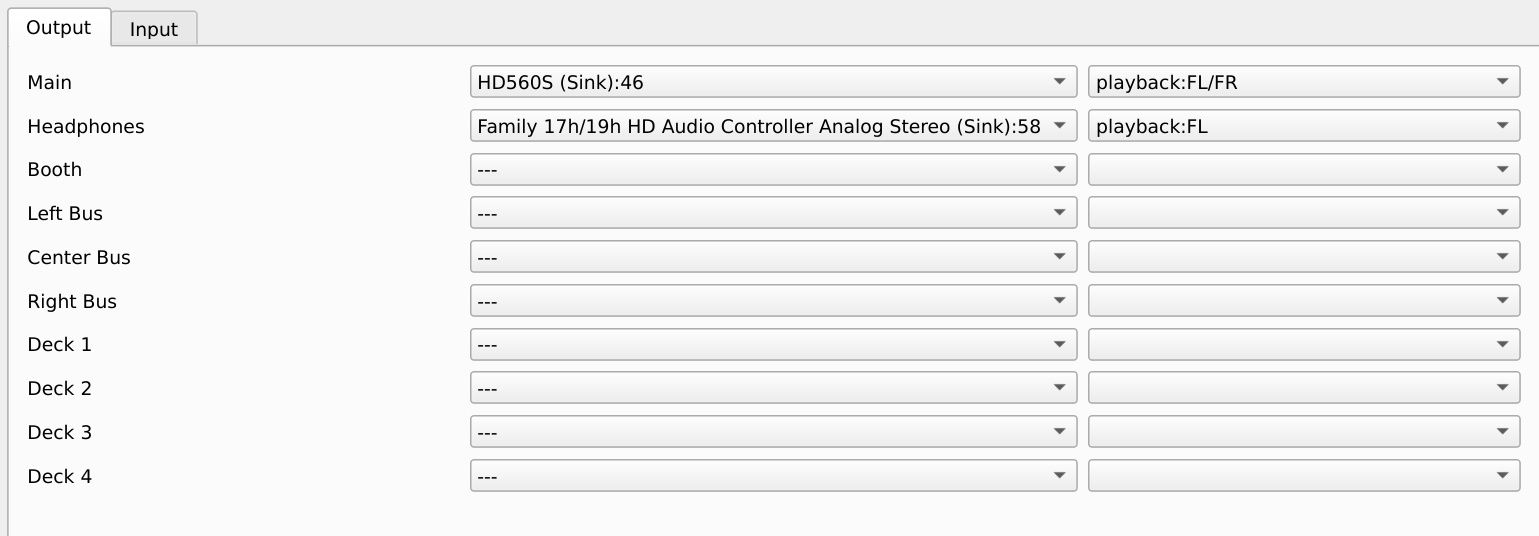
The patchbay is configured as:
Hardware volume control
The DJ controllers used along with Mixxx can have a dedicated soundcard, providing an audio interface with multiple inputs/outputs. With PipeWire, Mixxx can now directly control the controller’s hardware volume circuits when supported by the device. Instead of only changing the gain digitally inside Mixxx, you can assign these hardware controls to knobs on your controller and adjust them directly from Mixxx’s preferences. This has practical advantages for both inputs and outputs.
For audio input, this can improve the signal-to-noise ratio when analog signal is being converted to digital, and for audio outputs, we preserve more digital headroom, since we don't have to amplify audio digitally (which can cause clipping if boosted beyond the available digital range), and instead can use the analog amplification instead.
Hardware volume controls can become part of your setup instead of requiring to reach out to analog mixers or the main amp volume control.
Sample rate and buffer size negotiation
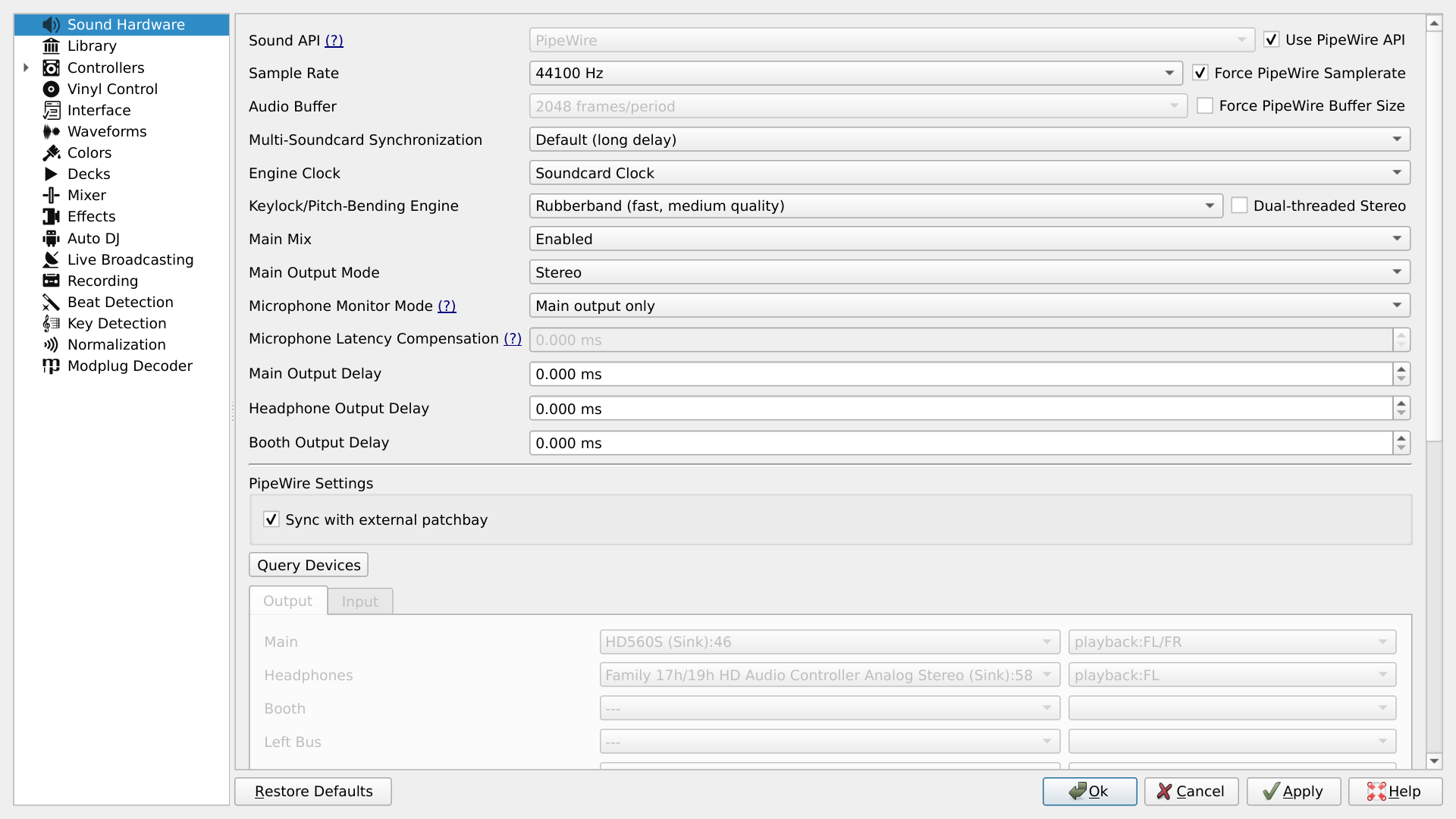
Since PipeWire lets multiple programs use a single soundcard, the server runs at a single quantum (buffer size) and sample rate, and any application either needs to agree to use the server-determined quantum/sample rate, or have PipeWire resample in between. Unlike JACK, where the server determines the sample rate and quantum and Mixxx adapts to them, with PipeWire Mixxx can either agree to use whatever quantum/sample rate PipeWire provides (and hence play cooperatively with the rest of the applications), or force its own quantum/sample rate. The latter can fail or be overridden when another specialized application forces its own quantum/sample rate. In that case, you have to choose between running one of either program, you cannot have your cake and eat it too ;).
Mixxx preference page with PipeWire options:
Buffering and latency
Under PortAudio, Mixxx has a concept of clock reference device. It is the device which provides and consumes samples to and from Mixxx synchronously (without buffering), and other devices buffer their audio during their callbacks. The buffered samples are consumed and new samples are produced during the callback of the clock reference device. As a result, the clock reference device experiences minimum latency, while other devices experience latency comprising of the audio buffer size and the number of configured buffers (more configured buffers lead to higher latency, but are less likely to experience buffer starvation and audio dropping).
With PipeWire, this buffering occurs internally, and the API allows one callback where we synchronously produce/consume samples, which occurs according to the graph driver hardware device timings. As a result the graph driver experiences minimum latency. Graph driver is assigned by the PipeWire priority.driver property, which can be configured in the wireplumber configuration.
Testing
You can try Mixxx with PipeWire by:
- Get a build of the main branch
- Run Mixxx with
--developerflag - Check the "Use PipeWire" checkbox in Sound API preference page
Report any issues, bugs, or general workflow/enhancement wishlist in the testing topic linked at the end.
Technical
This is technical information about the PipeWire work, mainly as documentation for the GSoC Work Product, and developers interested in this project. It is fine to skip this.
PipeWire objects: PipeWire models the soundcard hardware and applications with audio input/output through same abstraction, where a node is analogous to an audio process, which contains multiple ports for input/output, and links which connect the ports. The application is notified of the object creation/destruction through registry callbacks.
Threading: PipeWire has a thread_loop API, which creates a thread on which any PipeWire callbacks run on (for instance registry events, or node/device info events). Mutable state accessed simultaneously from PipeWire and Qt thread must either be threadsafe (like Mixxx's ControlObject), or use a synchronization mechanism (QObject::invokeMethod for triggering code execution in Qt thread from PipeWire thread and pw_thread_loop_lock/pw_thread_loop_unlock or pw_loop_invoke for vice versa). Audio callbacks run on a separate real-time thread and cannot use any waiting mechanism like mutexes or thread_loop synchronization API. Currently ControlObject is used to access state while in the audio thread.
API synchronization: A lot of PipeWire API (like object discovery) is asynchronous. For instance creating a link or adding a port to Mixxx does not immediately yield a usable object, it needs to be separately identified in the registry callback. We can synchronize to server events using API like pw_core_sync and pw_proxy_sync. Currently we only sync to initial node/port/link registration completion, so we can properly load Mixxx's routing configuration from disk after that, but this can be used further to implement more robust and predictable control flow.
Hardware devices: PipeWire uses ALSA UCM to create multiple logical routes on a single hardware device, where only some of all the possible routes might be active at a time (like mutual exclusion between laptop's speaker/headphone output). Each route can be associated with a node, so a single hardware device can map to multiple PipeWire nodes.
Work done
| Pull Request | Title | Status | Description |
|---|---|---|---|
| #16544 | SoundManager refactor | Merged | Precursor to implementing PipeWire support |
| #16590 | [GSoC] [WIP] PipeWire support | Merged | Adds support for PipeWire API |
| #16707 | Initialize/deinitialize SoundDeviceEnumerator on apiComboBox change | Merged | Handle PipeWire server disconnects/restarts |
| #16712 | Improve SoundDevice and Channel naming on Sound Hardware preference page for PipeWire API | Merged | Display more appropriate sound device and its ports names |
| #16772 | PipeWire link hotplug | Merged | Configure/Unconfigure Mixxx inputs/outputs on external link creation/destruction |
| #16812 | Add option to force requested quantum and samplerate | Merged | Add option to force PipeWire server to process requested quantum and samplerate |
| #16834 | Add QSlider for PipeWire hardware volume control | In progress (at 37583c7a1a) | Allow setting hardware device volume from Mixxx UI |
| #16918 | Implement Pipewire default device | In progress (at 4d291c11a3) | Add a proxy device for default PipeWire source/sink |
Pending work
- Currently PipeWire does not work with network clock. It can be implemented by triggering PipeWire audio callbacks from network clock, and implementing audio buffering.
Future Roadmap
- Currently Mixxx is architected around the PortAudio API, and PipeWire code adapts to that, leading to boilerplate. It would be nice to refactor that into an architecture which is sufficient for both APIs.
- Quantify the latency improvements of native PipeWire API over the ALSA and JACK API on PipeWire systems through PipeWire compatibility.
- Implement synchronization for SoundDevice opening/closing, and remove the arbitrary 5 second sleep after any device closing.
- Instead of the planned unified model where Mixxx internal UI is updated according to external PipeWire routing events, we have 2 separate modes where the internal UI is enabled/disabled. One solution can be to extend the Mixxx UI so it can accommodate the PipeWire supported scenario of configuring multiple audio devices onto a single Mixxx input/output, and unify the two modes, so that the UI is updated on external routing changes while still allowing the user to use the internal UI to route.
Links
- Proposal for this project.
- Testing topic on Zulip.



Comments