GSoC 2026: Rebuilding the LateNight Theme in QML


 gsoc,
gsoc-2026,
development,
UI,
QML,
LateNight
gsoc,
gsoc-2026,
development,
UI,
QML,
LateNight
Hi everyone! I am Ayush Sah, and I am thrilled to share that I will be working with Mixxx for Google Summer of Code (GSoC) 2026. Over the next few months, my project will focus on one of the most exciting shifts in Mixxx’s user interface history: rebuilding the iconic LateNight theme in native QML.
As Mixxx moves toward the 3.0 release, we are introducing the "New UI", which will be 100% based on Qt Quick / QML. This is a technology that unlocks modern aesthetics, fluid layout customization, and vector-based scaling. As a practical step toward that goal, I am developing a full QML port of the LateNight skin. It will deliver visual and functional parity with the classic design while providing a clean, real‑world reference for future community QML themes. This work aligns fully with the New UI effort, as both share the same underlying QML codebase.
Why QML?
Mixxx's legacy skin system is driven by complex XML and QSS (Qt Style Sheets) and generates thousands of QWidget instances at start-up, which takes a lot of time. This legacy skin system has served the project well, but it is increasingly difficult to maintain and does not naturally support the kind of responsive, animated, and scalable interface work expected from modern applications.
By moving LateNight to native QML, we aim to achieve:
- Modern Typography & Pixel-Perfect Scaling: Dynamic scaling across 4K displays, retina screens, and small screens such as Raspberry Pi setups.
- Hardware-Accelerated Rendering: Leveraging modern, native graphics APIs, specifically Apple Metal on macOS and Microsoft DirectX on Windows, instead of legacy OpenGL. This keeps the CPU free to focus on tasks like real-time audio processing and the application logic, while the GPU handles UI and waveform rendering.
- Theme Extensibility: Standardized, modular structure (
res/skins/LateNightQML) that other developers can use to construct their own custom layouts without duplicating core logic.
Why LateNight?
For years, LateNight has been a favorite for DJs performing in low-light environments. Its clean, dark layout and compact decks make it practical during real performances, especially on laptops where DJs need transport controls, mixer controls, waveforms, and library access visible at the same time.
That makes LateNight an ideal candidate for this port. It is familiar to many existing users, demanding enough to prove that QML can support a serious DJ workflow, and compact enough to complement the larger, touch-oriented direction of Mixxx's New UI.
Design Choice: Laptops vs. Small Touch Screens
An interesting distinction between the theme layouts is how they address screen space. While the New UI features larger but fewer widgets optimized for touchscreen setups and tablet DJs, LateNight is packed with tiny widgets. This compact style is highly optimized for traditional laptop displays and desktop environments, where DJs want to maximize the amount of info and controls visible on a single screen without needing touch gestures. I know there are a lot of LateNight lovers in the community and I hope you all will like this new version of LateNight, a QML version, in which I'm trying my best to restore the same look and feel!
Scope Reduction for the GSoC timeframe
The guiding constraint for this project is the 12-week GSoC timeline. Every technical decision has to balance ambition with the need to deliver something reliable, reviewable, and useful by the end of the program. That is why the project scope is deliberately focused on the LateNight QML skin itself, while avoiding large backend rewrites that would turn this into a separate infrastructure project.
A fully native QML library would require a new library backend. Today, the legacy library backend and legacy library widgets are tightly coupled, so replacing only the visual layer is not enough. Building that backend properly is important future work, but it is too large and too risky to combine with a 12-week theme port.
Instead, we chose a pragmatic middle ground: safely bridging the existing C++ library widgets into the QML viewport. This lets the project move forward with QML while keeping the music library stable and fully usable from day one. The same reasoning applies to preferences: for now, the legacy preferences dialog is being bridged and adapted to the new skin, rather than replaced outright.
Planned Project Steps
To make the scope of the project clear, here are the main areas of work planned for the LateNight QML port. Wherever possible, we will reuse components from Mixxx's New UI and focus this project on the parts that make LateNight distinct: its compact layout, laptop-friendly workflow, and familiar visual structure.
Reusing components from the New UI
- Decks and stem waveforms: Recreating LateNight's compact deck layout while reusing Mixxx's native QML waveform rendering, and providing controls for stems and beat-grid editing.
- Deck controls: Connecting playback controls such as play, cue, sync, loops, pitch/rate controls, hotcues, and beatgrid tools using the shared QML logic already developed for the New UI.
Building shared infrastructure
- Effects, samplers, and Mic/Aux racks: Adding these missing QML elements in a way that can support both LateNight QML and the New UI, reducing duplicated work between skins.
LateNight-specific layout and integration
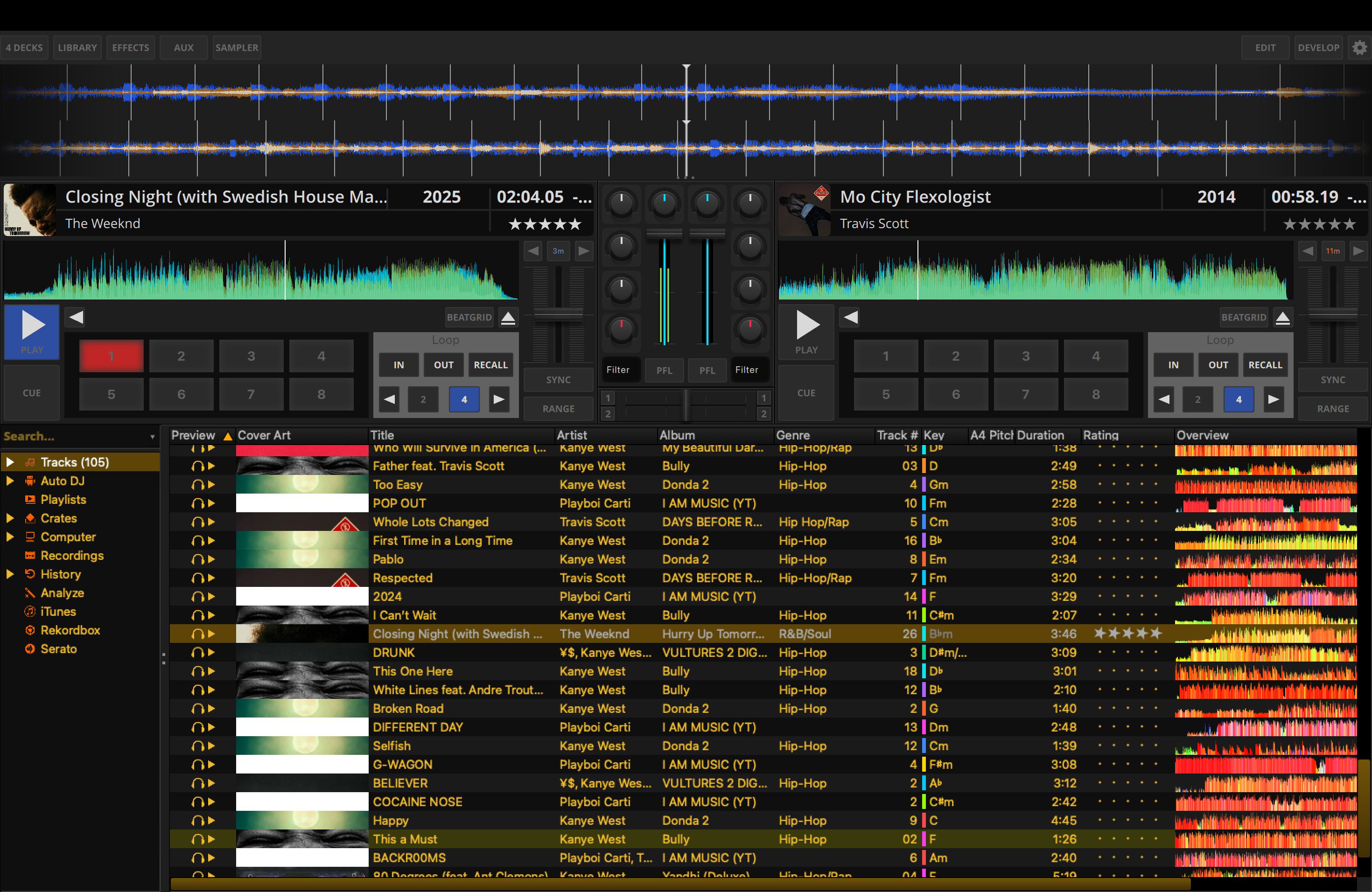
- Legacy library bridge: Hosting the existing C++ library sidebar and track table inside the QML viewport so the music library remains stable and usable while the QML transition continues. (Completed)
- Preferences integration: Adapting the existing preferences dialog bridge for the LateNight QML skin.
- Channel mixer: Styling EQ/filter controls, VU meters, and crossfader controls to match LateNight while reusing existing mixer logic.
- Layout variants: Designing compact and mini deck layouts for traditional laptop screen heights.
- Menu and accessibility support: Connecting menu actions and accessibility-related behavior so the skin remains usable across supported platforms.
Ultimately, releasing this experimental LateNight QML skin in a 2.x release is just the beginning. Our goal is to give you a hands-on preview of what lies ahead: the plan for Mixxx 3.0 is to leverage powerful new QML capabilities, bringing a completely rewritten library, a modern preferences dialog, fully custom hotcue layouts, and many more exciting visual and functional features as introduced in the QML Project announcement.
Milestone 1: Legacy Library Integration Completed!
I am incredibly excited to share that the first core milestone of this project has already been completed and merged in PR #16489! This PR successfully bridges Mixxx's legacy QWidget-based Library into the new QML engine.
Here is a sneak peek at the first draft of the LateNight QML theme in action:
Check out the Demo Video:
Watching embedded videos will transfer data to YouTube. To protect your privacy, you need to accept YouTubes privacy statement and terms of use first by clicking the button below.
Direct LinkHow to Test It Right Now
If you are a developer or a curious user who builds Mixxx from source, you can try out the new experimental LateNight QML skin today! Make sure you are building Mixxx from the latest main branch, where the new QML skin work is available.
Follow these steps to run and test it:
- Run Mixxx with the Developer Flag:
Launch your locally compiled Mixxx build from your terminal using the
--developerflag:./build/mixxx --developerThis flag is currently required to expose experimental QML skins during development, but it is planned to be removed once this workflow is ready for regular skin selection. - Enable the Skin: Once Mixxx opens, navigate to: Preferences -> Interface and change the theme/skin to LateNight QML (Experimental). You will have to restart Mixxx once to see the WIP QML skin.
- Tip for Accessing Preferences: While using the LateNightQML skin, you can re-access the Mixxx Preferences dialog at any time by pressing and holding the settings gear icon.
Get Involved!
This project is fully open source, and I would love to hear feedback and ideas from the community, especially regarding accessibility and touch-screen usability.
- Follow the Code: Keep track of all the latest LateNight QML work on our GitHub repository.
- Join the Discussion: Come chat with us and follow the active project updates in the QML stream on Zulip.
- Contribute: If you're familiar with QML or C++, we are always looking for reviewers and testers!
Stay tuned for more updates, and happy mixxxing!



Comments